Healthcare organizations depend on technology every hour of the day. From Electronic Health Records and patient portals to telehealth platforms, billing systems, diagnostic tools, secure messaging, cloud applications, and connected devices, IT is now deeply connected to patient care and daily operations.
When systems work properly, doctors, nurses, front-desk teams, billing staff, and administrators can do their jobs with confidence. When systems fail, the impact is immediate. A login issue can delay access to patient records. A network problem can slow down clinical workflows. A printing or scanning issue can interrupt documentation. A cybersecurity alert can create serious operational and compliance concerns.
That is why healthcare leaders often face an important question:
Should we rely on an internal IT team, or should we use a managed help desk provider?
This comparison matters because healthcare IT is not the same as general office IT. Medical organizations need fast response times, reliable uptime, HIPAA-aligned processes, proactive monitoring, strong cybersecurity, and support that understands clinical workflows.
Both managed help desk support and in-house IT teams have advantages. The right choice depends on your organization’s size, budget, support hours, technical complexity, compliance needs, and long-term growth plans.
This guide explains the difference between a managed help desk and an in-house IT team, compares the costs, reviews staffing efficiency, explains reactive vs proactive IT support, and helps healthcare organizations decide which model is better.
What Is a Managed Help Desk?
A managed help desk is an outsourced IT support service provided by a third-party technology partner. Instead of hiring every IT role internally, a healthcare organization works with an external provider that manages user support, ticket resolution, remote troubleshooting, system monitoring, escalation, reporting, and sometimes broader managed IT services.
A managed help desk usually supports employees through multiple channels, including phone, email, ticket portal, live chat, and remote desktop tools. When a doctor, nurse, front-desk employee, billing specialist, or administrator has a technology issue, they contact the managed help desk for support.
Common managed help desk services include:
- Password resets and login support
- EHR and EMR access troubleshooting
- Workstation and laptop support
- Printer, scanner, and device troubleshooting
- Network connectivity support
- Email and cloud application support
- Telehealth platform assistance
- Ticket tracking and reporting
- Remote desktop support
- Escalation to advanced engineers
- Proactive monitoring
- Cybersecurity alert response
- Vendor coordination
For healthcare organizations, a managed help desk can provide structured IT outsourcing without requiring the organization to build and manage a full internal support department.
What Is an In-House IT Team?
An in-house IT team is made up of employees hired directly by the healthcare organization. These employees work internally and support the organization’s systems, staff, devices, applications, infrastructure, and security needs.
An internal IT team may include IT support specialists, system administrators, network engineers, cybersecurity staff, help desk technicians, IT managers, and application support analysts. In smaller clinics, the team may be only one or two people. In larger healthcare networks, the team may include multiple departments.
In-house IT teams usually have strong knowledge of the organization’s internal workflows, staff habits, facility layout, vendor relationships, and historical technology issues. They are physically closer to the organization and may be better positioned for on-site support.
Common in-house IT responsibilities include:
- Daily user support
- Hardware setup and repair
- Internal system administration
- Network management
- EHR and EMR coordination
- Security policy implementation
- Vendor management
- Staff onboarding and offboarding
- Device inventory
- IT planning
- On-site troubleshooting
An internal team can be valuable, especially for organizations that need frequent physical support, custom workflows, or direct control over IT operations.
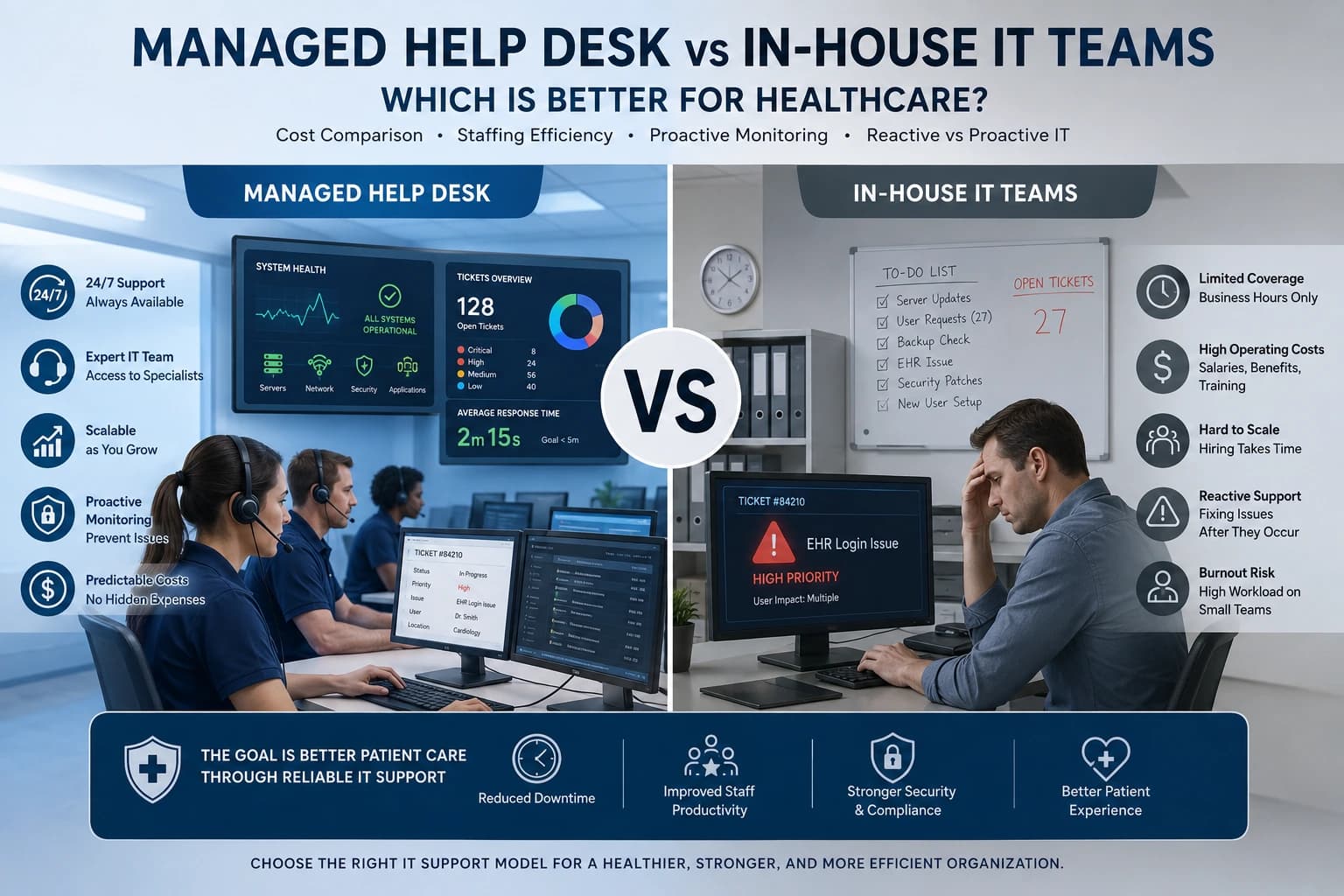
Managed Help Desk vs In-House IT: Quick Comparison
| Comparison Area | Managed Help Desk | In-House IT Team |
|---|---|---|
| Staffing | External support team | Internal employees |
| Cost Structure | Monthly service fee | Salaries, benefits, tools, training |
| Coverage | Can include 24×7 support | Often limited by staff schedules |
| Scalability | Easier to scale up or down | Requires hiring and training |
| Proactive Monitoring | Usually included in managed plans | Depends on tools and staff capacity |
| Healthcare Experience | Depends on provider specialization | Depends on hiring and training |
| On-Site Support | May be limited or scheduled | Usually stronger for physical issues |
| Ticket Reporting | Often structured and automated | Depends on internal systems |
| Cybersecurity Support | Can include dedicated security monitoring | Requires specialized internal skills |
| Best Fit | Growing clinics, multi-location practices, organizations needing coverage | Larger organizations needing direct control and frequent on-site presence |
Both models can work well. The main question is not which one is always better. The real question is which one fits your healthcare organization’s needs, risks, budget, and support expectations.
Cost Comparison: Managed Help Desk vs In-House IT
Cost is one of the biggest reasons healthcare organizations compare managed help desk vs in-house IT.
At first, an in-house IT team may seem more controlled because the organization directly employs the staff. However, the real cost of an internal team includes more than salaries.
In-house IT costs may include:
- Employee salaries
- Benefits
- Payroll taxes
- Recruitment costs
- Training and certifications
- Paid time off
- Sick leave coverage
- Overtime
- On-call compensation
- Help desk software
- Remote support tools
- Monitoring tools
- Cybersecurity tools
- Hardware and equipment
- Management time
- Backup staffing
If your organization needs 24×7 coverage, the cost increases even more. One or two internal IT employees cannot realistically provide continuous support every day without burnout. To cover nights, weekends, holidays, vacations, and sick days, healthcare organizations may need multiple shifts or additional staff.
A managed help desk usually works on a monthly service model. Pricing may be based on users, devices, locations, ticket volume, service level, or a custom support package. This makes budgeting more predictable.
Managed help desk costs may include:
- Monthly support fee
- Onboarding fee
- Per-user or per-device pricing
- After-hours support coverage
- Monitoring tools
- Ticketing platform
- Reporting
- Escalation support
- Optional on-site support
- Security add-ons
For many small and mid-sized healthcare organizations, managed help desk support can be more cost-efficient because they gain access to a broader team without hiring every role internally.
However, the lowest price is not always the best option. Healthcare organizations should compare what is included in each model. A cheaper provider may not include 24×7 support, healthcare application experience, HIPAA-aligned processes, or strong escalation.
Staffing Efficiency
Staffing is another major difference between managed help desk and in-house IT.
With an internal team, your organization is responsible for hiring, training, scheduling, supervising, and replacing IT staff. If a key employee leaves, the organization may lose important technical knowledge. If the team is small, one person may be responsible for too many tasks, including help desk tickets, network issues, cybersecurity, vendor calls, device setup, and strategic planning.
This can lead to overload. Internal IT staff may spend most of their day solving basic tickets instead of improving systems, strengthening security, or planning technology upgrades.
A managed help desk improves staffing efficiency by giving users a dedicated support channel. Routine issues are handled by the help desk, while more complex issues are escalated to advanced technicians or engineers. This reduces pressure on internal leadership and allows healthcare organizations to access a wider support structure.
For example, instead of hiring separate people for Level 1 support, Level 2 troubleshooting, monitoring, after-hours coverage, and ticket reporting, a managed provider may include these capabilities in one service model.
This is especially helpful for healthcare organizations that are growing quickly, opening new locations, expanding telehealth, or trying to improve staff productivity.
Reactive vs Proactive IT Support
One of the most important differences in healthcare IT is reactive vs proactive support.
Reactive IT support means the team responds after something breaks. A user reports an issue, the technician investigates, and then the problem is fixed. Reactive support is necessary, but it is not enough for modern healthcare environments.
Proactive IT support means the provider monitors systems, looks for warning signs, and tries to prevent problems before they disrupt staff or patients.
A managed help desk often includes proactive monitoring as part of the service. This may include monitoring servers, workstations, networks, backups, endpoint security, disk space, internet connections, and application performance.
For healthcare organizations, proactive monitoring can reduce downtime and improve operational stability. If a server is running out of storage or a backup fails, the support team can respond before the issue becomes a larger problem.
An in-house IT team can also provide proactive support, but only if it has the right tools, time, staffing, and expertise. Many small internal teams are too busy responding to daily tickets to monitor systems consistently.
In healthcare, proactive support is especially important because small technical issues can quickly affect clinical workflows.
24×7 Coverage and After-Hours Support
Healthcare does not stop at 5 PM. Many organizations operate during evenings, weekends, holidays, and overnight shifts. Hospitals, emergency centers, urgent care clinics, senior care facilities, laboratories, and multi-location healthcare groups may need IT support at any hour.
A managed help desk can offer 24×7 coverage more easily than a small internal team. This allows staff to get help whenever technology issues appear.
In-house teams may struggle with after-hours coverage unless the organization has enough staff to rotate shifts. If one or two people are expected to stay on-call constantly, burnout becomes a serious risk. Staff may become tired, response times may suffer, and long-term retention may become difficult.
Before choosing a model, healthcare leaders should ask:
- Do our staff work outside normal business hours?
- Do doctors need EHR access at night?
- Do we offer telehealth after hours?
- Do patients use portals outside office hours?
- Do we have multiple locations or time zones?
- Can our internal team handle after-hours support without burnout?
If the answer is yes to several of these questions, a managed help desk may provide stronger coverage.
Healthcare Compliance and HIPAA-Aligned Support
Healthcare organizations must protect sensitive patient information. IT support teams may interact with systems that contain protected health information, login credentials, clinical records, billing data, and internal communications.
Because of this, both managed help desk providers and in-house IT teams must follow secure support processes.
A healthcare-focused managed help desk should use HIPAA-aligned procedures, secure remote access, access controls, documentation standards, identity verification, ticket privacy rules, and audit-friendly processes. If the provider may access protected health information, the healthcare organization should review whether a Business Associate Agreement is required.
An in-house IT team may have more direct control over internal policies, but it still needs proper training, documentation, monitoring, and compliance procedures. Simply having IT staff on payroll does not automatically make support secure or compliant.
Healthcare leaders should evaluate both models based on:
- Secure remote access
- User verification before password resets
- Access logs
- Role-based permissions
- Ticket documentation
- Incident response process
- Staff training
- Vendor agreements
- Data handling rules
- Audit readiness
The right model should reduce compliance risk, not increase it.
Cybersecurity Monitoring
Healthcare is a high-risk industry for cyber threats. Ransomware, phishing, stolen credentials, malware, and unauthorized access can seriously disrupt operations and expose sensitive data.
A managed help desk may include cybersecurity monitoring or work alongside a managed security provider. This can include endpoint monitoring, suspicious login alerts, phishing response, antivirus alerts, patching support, and escalation of security incidents.
In-house teams can also manage cybersecurity, but they need specialized skills and enough time. Cybersecurity is not a one-time task. It requires continuous monitoring, regular updates, user education, risk review, and incident planning.
For small internal teams, cybersecurity can become difficult because daily support tickets take priority. As a result, important security tasks may be delayed.
A managed help desk can improve cybersecurity response by making sure alerts are not ignored and incidents are escalated quickly. However, not every managed help desk includes advanced security. Healthcare organizations should confirm exactly what is included.
EHR, EMR, and Clinical Application Support
EHR and EMR systems are central to healthcare operations. If staff cannot access patient charts, update notes, view lab results, or complete documentation, care delivery becomes slower and more stressful.
Both managed help desks and in-house IT teams can support EHR and EMR workflows, but their strengths may differ.
An in-house IT team usually understands the organization’s specific workflows, departments, providers, templates, devices, and common user issues. This can be helpful for complex internal processes.
A healthcare-focused managed help desk can provide broader coverage and faster ticket handling, especially for login issues, connectivity problems, browser errors, workstation problems, printing, scanning, and vendor escalation.
The best approach depends on the complexity of your EHR environment. Some organizations use a managed help desk for first-level support and keep internal experts for advanced EHR workflow management. This hybrid model often works well because routine tickets are resolved quickly while internal specialists focus on clinical optimization.
Ticket Escalation and Incident Resolution
A strong IT support model needs a clear ticket escalation process.
In a managed help desk model, issues are usually divided into levels:
Level 1 support handles simple issues such as password resets, login problems, basic troubleshooting, and routine user questions.
Level 2 support handles more advanced issues such as application errors, workstation problems, device configuration, and network troubleshooting.
Level 3 support handles complex infrastructure problems, server issues, cybersecurity incidents, advanced application problems, and vendor coordination.
This structure helps tickets move to the right person quickly.
In-house teams may also use escalation, but smaller teams often have fewer layers. The same person may handle everything from basic password resets to complex network failures. This can slow down resolution and create stress for internal staff.
For healthcare organizations, incident resolution must be fast and organized. A clear escalation process helps reduce downtime and improves accountability.
Reporting and Visibility
A managed help desk usually includes ticket reports, performance dashboards, and SLA tracking. These reports help healthcare leaders understand the number of tickets, common issues, response times, resolution times, user satisfaction, and recurring problems.
This visibility is valuable because it turns IT from a hidden support function into a measurable operational system.
In-house teams may also provide reporting, but it depends on the tools and processes they use. If the organization does not have a proper ticketing system, leadership may not know how many issues are happening or where support time is being spent.
Good reporting helps answer important questions:
- Which departments submit the most tickets?
- What issues happen repeatedly?
- Are response times improving?
- Are EHR-related tickets increasing?
- Are users satisfied with support?
- Are certain devices or locations causing problems?
- Do we need more training, better hardware, or stronger systems?
Managed help desk reporting can help healthcare organizations make smarter IT decisions.
Scalability for Growing Healthcare Organizations
As healthcare organizations grow, IT support needs also grow. New locations, more users, more devices, telehealth services, patient portal usage, cloud tools, and cybersecurity needs all increase support demand.
Scaling an in-house IT team requires hiring, training, budgeting, and management. This takes time. If the organization grows faster than the IT team, support quality may drop.
A managed help desk can usually scale faster. The provider can adjust support capacity, add users, expand service hours, and include more locations without the healthcare organization hiring several new employees.
This makes managed support attractive for growing clinics, multi-location practices, specialty groups, and healthcare networks.
However, larger healthcare organizations may still need internal IT leadership to manage strategy, vendor relationships, budgeting, and internal decision-making. In these cases, a managed help desk can support daily operations while internal IT focuses on higher-level planning.
Pros of a Managed Help Desk
A managed help desk offers several advantages for healthcare organizations.
First, it provides predictable support coverage. Organizations can choose business-hours support, extended support, or full 24×7 coverage based on their needs.
Second, it improves cost control. Instead of hiring multiple roles internally, organizations pay for a service package.
Third, it gives access to broader expertise. A managed provider may have technicians, engineers, security specialists, monitoring tools, and escalation teams.
Fourth, it improves ticket tracking and reporting. Every issue can be logged, prioritized, resolved, and reviewed.
Fifth, it can reduce pressure on internal staff. Routine support tasks can be handled externally, allowing internal leaders to focus on strategic improvements.
Sixth, it supports scalability. As the organization grows, the managed help desk can expand more easily than an internal team.
Cons of a Managed Help Desk
A managed help desk also has some limitations.
First, the provider may not fully understand your internal workflows at the beginning. Good onboarding is needed.
Second, on-site support may be limited or cost extra. If your organization needs frequent physical troubleshooting, this should be discussed before signing a contract.
Third, service quality depends on the provider. Not all managed help desks understand healthcare. A general IT provider may not be familiar with EHR workflows, HIPAA-aligned processes, or clinical urgency.
Fourth, some organizations may feel they have less direct control. Clear communication, reporting, and service agreements are needed to avoid this issue.
Pros of an In-House IT Team
An in-house IT team has clear advantages.
Internal staff understand the organization’s culture, workflows, locations, departments, and users. They can build strong relationships with doctors, nurses, administrators, and leadership.
They can also provide faster physical support when a device, cable, printer, workstation, or on-site system needs hands-on attention.
In-house teams give leadership more direct control over priorities, projects, and internal processes. For larger healthcare organizations, internal IT leadership is often necessary.
An in-house team can also develop deep knowledge of custom workflows, specialty applications, and unique clinical processes.
Cons of an In-House IT Team
The biggest challenge with an in-house IT team is cost and capacity.
Hiring qualified healthcare IT staff can be expensive. Keeping them trained, certified, and available can also be difficult. If the team is small, coverage gaps are common.
Another challenge is burnout. Healthcare IT can be demanding, especially if staff are expected to handle daily tickets, after-hours emergencies, security alerts, projects, and vendor issues.
Small internal teams may also lack specialized skills in cybersecurity, cloud infrastructure, advanced networking, or compliance documentation.
If one key person leaves, the organization may lose important knowledge and face support delays.
When a Managed Help Desk Is Better for Healthcare
A managed help desk may be the better choice when a healthcare organization needs reliable coverage without hiring a large internal team.
It is especially useful when:
- The organization needs 24×7 or after-hours support
- The internal team is overloaded
- Ticket volume is increasing
- Multiple locations need consistent support
- Leadership wants better reporting
- The organization needs proactive monitoring
- Hiring IT staff is too expensive
- Cybersecurity alerts need faster response
- Staff need one clear support channel
- The organization wants predictable monthly IT costs
Managed help desk support is often a strong fit for small and mid-sized healthcare organizations, growing practices, specialty clinics, urgent care groups, diagnostic centers, and multi-location providers.
When an In-House IT Team Is Better for Healthcare
An in-house IT team may be better when the organization needs frequent on-site support, complete internal control, or deeply customized workflows.
It may be the better choice when:
- The organization is large enough to afford a full IT department
- On-site troubleshooting is needed daily
- Systems are highly customized
- Internal IT leadership is required
- The organization has strict internal policies
- The team needs direct involvement in clinical technology planning
- There are complex integrations that require constant internal attention
Large hospitals and healthcare systems often need internal IT teams because their environments are too complex to fully outsource.
The Best Option: A Hybrid IT Support Model
For many healthcare organizations, the best answer is not managed help desk or in-house IT. The best answer is both.
A hybrid IT support model combines internal IT leadership with outsourced managed help desk support.
In this model, the managed help desk handles daily tickets, basic troubleshooting, remote support, after-hours coverage, monitoring, and reporting. The internal IT team focuses on strategy, vendor management, clinical systems, infrastructure planning, compliance oversight, and on-site needs.
This model gives healthcare organizations the best of both sides. They get the scalability and coverage of a managed help desk while keeping internal control and organizational knowledge.
A hybrid model is often ideal for healthcare organizations that are growing, improving IT maturity, or trying to reduce pressure on internal staff.
How to Choose the Right Model
Before deciding, healthcare leaders should review their current IT environment carefully.
Start by asking:
- How many users do we support?
- How many devices and locations do we have?
- Do we need support after hours?
- How many IT tickets do we receive each month?
- Is our internal team overloaded?
- Are we mostly reactive or proactive?
- Do we have strong cybersecurity monitoring?
- Are staff satisfied with IT response times?
- Do we have proper ticket reporting?
- Are recurring issues being tracked?
- Can we scale our current IT model?
- Do we need more healthcare-specific IT experience?
If your organization struggles with support delays, after-hours coverage, limited reporting, or overloaded staff, a managed help desk may be the better option.
If your organization needs deep on-site control and has the budget for a full IT department, an in-house team may remain important.
If you need both daily support and internal control, a hybrid model may be the smartest path.
Final Verdict: Which Is Better for Healthcare?
There is no single answer for every healthcare organization.
A managed help desk is better for healthcare organizations that need cost efficiency, 24×7 coverage, proactive monitoring, ticket reporting, scalability, and access to broader technical support without building a large internal department.
An in-house IT team is better for healthcare organizations that need direct control, frequent on-site support, deep internal workflow knowledge, and dedicated internal technology leadership.
For many healthcare providers, the best solution is a hybrid model. This allows the managed help desk to handle routine and after-hours support while the internal team manages strategic projects, clinical systems, compliance oversight, and on-site needs.
The goal is not just to reduce IT costs. The goal is to protect patient care, improve staff productivity, reduce downtime, strengthen cybersecurity, and create a reliable technology environment for healthcare operations.
Conclusion
The comparison between managed help desk vs in-house IT is an important decision for healthcare organizations. Technology now supports nearly every part of patient care, from EHR access and telehealth visits to billing, communication, diagnostics, and administrative operations.
An in-house IT team provides control, on-site availability, and deep organizational knowledge. A managed help desk provides scalability, predictable cost, broader support coverage, proactive monitoring, and stronger ticket management.
Healthcare leaders should not make the decision based only on price. They should compare coverage, response times, compliance processes, cybersecurity support, reporting, staffing efficiency, and long-term growth needs.
For small and mid-sized healthcare organizations, a managed help desk can often provide stronger value than building a full internal team. For larger organizations, internal IT remains important, but outsourcing the help desk can improve efficiency and reduce pressure on internal staff.
The right IT support model should help your organization reduce downtime, support clinical teams, protect sensitive data, improve response times, and deliver better patient care.
FAQs
1. What is the difference between a managed help desk and an in-house IT team?
A managed help desk is an outsourced support service provided by an external IT company. An in-house IT team is made up of employees hired directly by the healthcare organization. A managed help desk usually provides broader coverage and structured ticket support, while an in-house team offers more direct control and on-site knowledge.
2. Is a managed help desk cheaper than an in-house IT team?
In many cases, a managed help desk can be more cost-efficient because the healthcare organization pays a predictable service fee instead of hiring multiple employees. However, the total cost depends on users, devices, locations, support hours, ticket volume, and service scope.
3. Can a managed help desk support EHR and EMR systems?
Yes, many healthcare-focused managed help desk providers can support common EHR and EMR issues such as login problems, workstation errors, printing, scanning, browser issues, and connectivity. More complex application issues may need escalation to the EHR vendor.
4. Is outsourced IT support safe for healthcare organizations?
Outsourced IT support can be safe when the provider follows HIPAA-aligned procedures, secure remote access rules, access controls, documentation standards, and proper user verification. Healthcare organizations should review vendor agreements, security processes, and responsibilities before choosing a provider.
5. When should a healthcare organization choose an in-house IT team?
An in-house IT team may be better when the organization needs frequent on-site support, direct control, custom workflows, internal technology leadership, and daily involvement in clinical systems. Large hospitals and complex healthcare networks often need internal IT teams.
6. When should a healthcare organization choose a managed help desk?
A managed help desk may be better when the organization needs 24×7 support, predictable monthly costs, proactive monitoring, faster ticket handling, scalability, reporting, and reduced pressure on internal staff.
7. What is the best IT support model for healthcare?
For many healthcare organizations, the best model is hybrid IT support. This means keeping internal IT leadership while outsourcing daily help desk tickets, after-hours support, remote troubleshooting, monitoring, and reporting to a managed help desk provider.