Healthcare teams depend on technology every minute. Patient intake, EHR access, scheduling, billing, lab communication, phones, printers, secure email, cloud apps, and reporting all need reliable IT support. When one system fails, staff lose time, patients wait longer, and daily operations slow down.
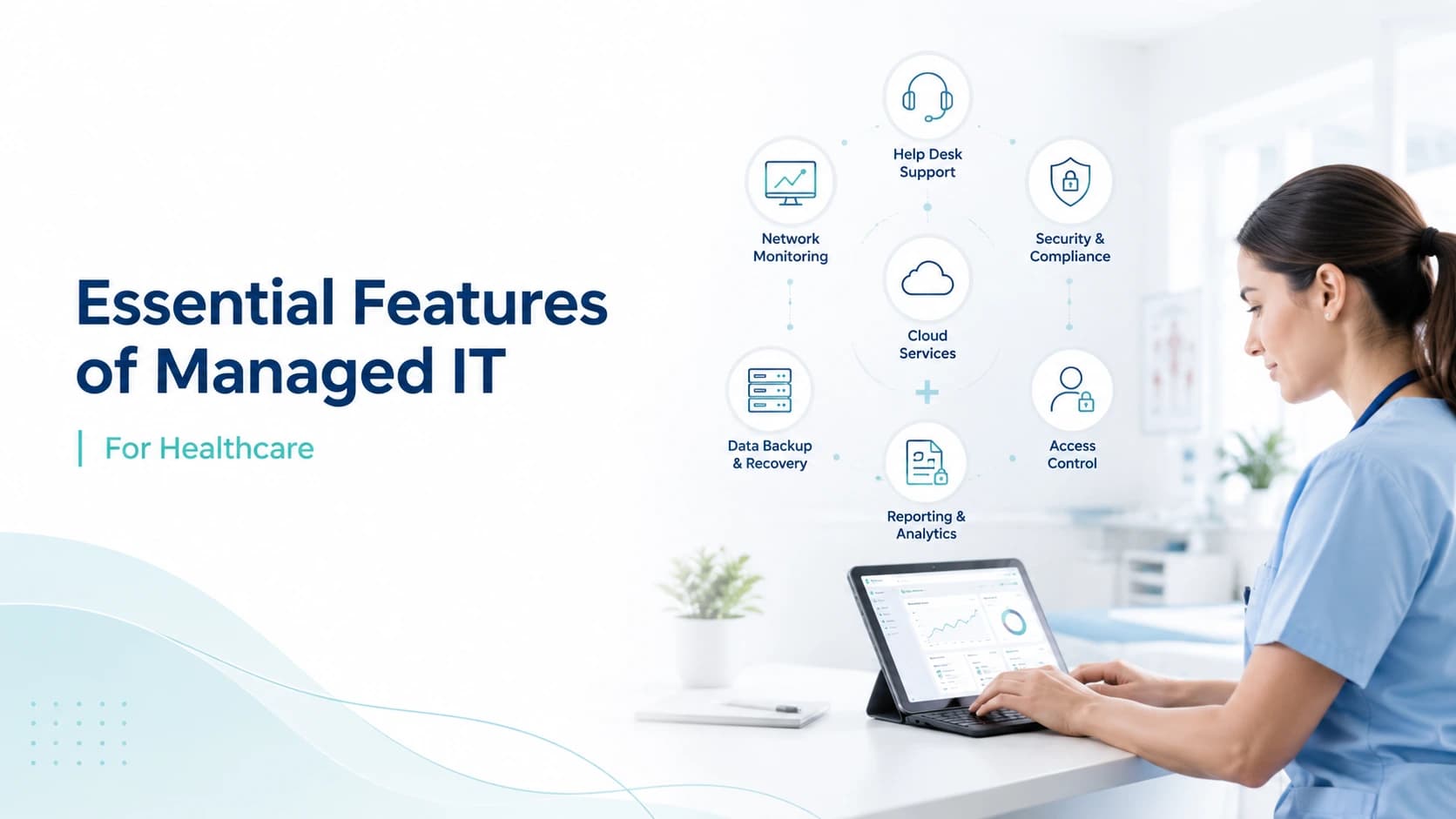
That is why healthcare managed IT is not only about fixing computers. It is about keeping care teams connected, protected, and productive. The right provider should combine healthcare IT help desk support, NOC services, network monitoring, tier 1 2 3 support, SLA response time, HIPAA managed services, encryption, access control, backups, and clear reporting.
This guide explains the essential features every clinic, hospital, lab, and healthcare group should expect from a managed IT service provider.
Healthcare-Focused Help Desk Support
The help desk is often the first feature healthcare staff notice. It gives users one clear place to report issues, ask for help, and get technical problems resolved.
Healthcare IT help desk support should cover common daily problems such as password resets, email errors, printer failures, slow computers, software access, login issues, internet problems, and EHR connectivity concerns. The goal is to reduce disruption so clinical and administrative teams can continue working.
A strong help desk should not feel random or informal. Every request should become a ticket, receive a priority level, and remain visible until resolved. This helps leadership see what issues keep returning and where systems need improvement.
Tier 1 2 3 Support
Managed IT support should include different technical levels. Tier 1 support handles basic user issues such as passwords, email setup, simple troubleshooting, and device questions. Tier 2 support handles deeper problems such as application errors, workstation performance, network access, and recurring issues. Tier 3 support handles advanced problems such as server failures, network outages, security incidents, cloud configuration, and complex escalations.
This structure matters in healthcare because not all problems are equal. A printer issue in one office is different from an EHR outage affecting all providers. Tiered support ensures the right skill level responds to the right problem.
NOC Services for Healthcare
A Network Operations Center, or NOC, monitors IT systems behind the scenes. It watches servers, networks, endpoints, firewalls, connectivity, uptime, and alerts.
For healthcare organizations, NOC services are valuable because they support proactive issue detection. Instead of waiting for staff to report a problem, the NOC can identify warning signs early. This may include high server usage, device health problems, offline systems, failed services, unusual traffic, or network instability.
NOC services help move healthcare IT from reactive repair to proactive management. This reduces downtime risk and gives leadership better visibility into system health.
Network Monitoring and Uptime Protection
Network monitoring is one of the most important managed IT features for healthcare. A slow or unstable network can affect EHR access, cloud applications, phones, printers, billing systems, and patient communication tools.
Managed IT providers should monitor routers, switches, firewalls, Wi-Fi, internet connections, servers, and critical endpoints. They should also track performance trends, outages, alerts, and recurring failures.
Good monitoring does not only detect downtime. It helps prevent it by showing capacity problems, weak signals, failing hardware, or overloaded systems before they cause larger disruption.
SLA Response Time
A Service Level Agreement, or SLA, defines how quickly the provider responds to different types of issues. This is essential for healthcare because urgent problems need clear escalation.
For example, a full network outage may require immediate response, while a single user password issue may have a lower priority. A strong SLA should define response times, support hours, escalation steps, communication rules, and how critical incidents are handled.
Healthcare organizations should never accept vague promises like fast support. They should ask for written SLA response time expectations so staff know what to expect during normal and urgent situations.
24/7 Monitoring and Support Options
Many healthcare systems need to stay available beyond normal office hours. Backups may run at night. Remote access may be used after hours. Security alerts may appear at any time. Some facilities operate evenings, weekends, or full-time.
Managed IT should offer 24/7 monitoring and support options based on the organization’s risk level. This does not always mean every small issue is handled at midnight, but critical alerts and outages should have a defined process.
For healthcare, after-hours coverage can prevent long delays and reduce the risk of staff discovering major problems the next morning.
HIPAA Managed Services
Healthcare organizations handle electronic protected health information, so managed IT must support security and compliance readiness. HIPAA managed services should help with safeguards that protect confidentiality, integrity, and availability.
An MSP should not claim that technology alone makes an organization HIPAA compliant. Compliance also involves policies, training, risk analysis, leadership decisions, and legal responsibilities. However, the right managed IT provider can support technical controls, documentation, monitoring, access management, backup practices, and risk reduction.
This support helps healthcare organizations build a stronger security foundation.
Access Control and User Permissions
Access control is a core feature of healthcare managed IT. Staff should only access the systems and data needed for their role.
Managed IT providers can help manage user accounts, permissions, onboarding, offboarding, password policies, multi-factor authentication, and role-based access. They can also help review inactive accounts and remove access when employees leave.
Poor access control creates risk. Former staff accounts, shared passwords, unnecessary admin rights, and weak authentication can expose sensitive systems. A strong MSP helps reduce these gaps.
Encryption and Data Protection
Encryption helps protect data when it is stored or transmitted. Healthcare organizations should consider encryption for laptops, mobile devices, backups, email, cloud storage, and systems that handle sensitive information.
Managed IT providers can help configure encryption tools, monitor device protection, and support secure communication practices. They can also help confirm whether laptops and backups are protected if devices are lost or stolen.
Encryption is not the only security requirement, but it is an important layer in a healthcare IT environment.
Backup Monitoring and Disaster Recovery Support
Backups are only useful if they work when needed. Managed IT should include backup monitoring, failure alerts, restore testing, and disaster recovery planning.
Healthcare organizations should know what is backed up, how often backups run, where data is stored, how long data is retained, and how quickly systems can be restored.
A backup plan should cover servers, key applications, files, databases, cloud systems, and critical workflows. Without proper monitoring, a failed backup may go unnoticed until recovery is needed.
Endpoint Protection and Patch Management
Every workstation, laptop, and server can become a risk if it is outdated or poorly protected. Endpoint protection helps defend devices against malware, suspicious behavior, and unauthorized activity.
Patch management keeps operating systems, applications, and security updates current. This is important because outdated software can create known weaknesses.
Managed IT providers should track patch status, apply updates carefully, monitor failures, and report exceptions. Healthcare organizations need patching that balances security with operational continuity.
EHR and Clinical System Support Coordination
Healthcare managed IT should support the technology environment around EHR and clinical systems. This includes workstations, browsers, networks, user access, printing, scanning, connectivity, and vendor coordination.
An MSP may not replace the EHR vendor, but it should help troubleshoot technical issues and communicate with vendors when needed.
For example, if users cannot access the EHR, the MSP can check the network, device, browser, permissions, and connectivity before escalating to the software vendor. This saves time and reduces confusion.
Server, Cloud, and Infrastructure Management
Healthcare organizations may use on-premise servers, cloud platforms, Microsoft 365, file storage, virtual machines, databases, or hybrid environments. Managed IT should support the infrastructure that keeps these systems available.
This includes monitoring server health, storage, performance, access, updates, and alerts. For cloud systems, the provider should help manage users, permissions, configuration, security settings, and service issues.
Strong infrastructure management helps prevent hidden problems from turning into major outages.
Cybersecurity Incident Response
Security incidents require a clear response plan. Managed IT should help detect suspicious activity, isolate affected systems, escalate alerts, document events, and support recovery.
Healthcare organizations should ask how the MSP handles malware, phishing, unauthorized access, suspicious logins, ransomware warnings, and compromised accounts.
The response process should include communication, containment, investigation, remediation, and documentation. In healthcare, delayed or disorganized incident response can increase operational and compliance risk.
Reporting and IT Visibility
Leadership needs visibility into IT performance. Managed IT should include reports that show ticket trends, response times, recurring issues, device health, patch status, backup status, security alerts, and recommendations.
Reporting helps healthcare leaders make better decisions. It also shows whether the MSP is improving the environment or only closing tickets.
Regular review meetings are useful because they turn IT support into a planning function, not just a repair service.
Vendor Management Support
Healthcare organizations often work with many vendors, including EHR companies, phone providers, internet providers, billing platforms, imaging systems, printers, and cloud tools.
Managed IT providers can help coordinate with vendors when technical issues involve more than one system. This reduces the burden on office managers and internal teams.
Vendor management is especially useful when no one knows whether the issue is caused by the network, device, software, internet provider, or application vendor.
Onboarding and Offboarding Workflows
Employee changes create security and productivity risks. Managed IT should support clear onboarding and offboarding workflows.
For new employees, this may include creating accounts, assigning permissions, setting up devices, configuring email, enabling MFA, and confirming access to required systems.
For departing employees, this may include disabling accounts, removing access, collecting devices, changing shared credentials, and documenting completion.
These steps protect healthcare systems and reduce access gaps.
Documentation and Asset Inventory
A reliable managed IT provider should maintain documentation. This includes users, devices, servers, software, warranties, network diagrams, vendors, licenses, access rules, backup plans, and support processes.
Asset inventory is important because healthcare organizations cannot protect systems they do not understand. Documentation also makes troubleshooting faster and reduces dependence on one person’s memory.
Good documentation improves continuity when staff change, systems are upgraded, or incidents occur.
Why These Features Matter for Patient Care
Managed IT features are not only technical. They affect patient care indirectly by helping staff work without avoidable interruptions.
When help desk support is responsive, front desk teams can schedule patients faster. When network monitoring works, providers can access records more reliably. When backups are monitored, recovery becomes more realistic. When access control is strong, sensitive data is better protected.
A mature managed IT service helps healthcare organizations stay focused on patients instead of technology problems.
Choosing the Right Healthcare Managed IT Provider
When choosing a provider, look for healthcare experience, clear SLAs, strong help desk processes, NOC services, monitoring, cybersecurity support, documentation, and transparent reporting.
Ask whether the provider understands EHR workflows, compliance readiness, clinical downtime, after-hours needs, and vendor coordination.
The right MSP should explain exactly what is included and how support will be delivered. Avoid providers that offer vague packages without understanding your environment.
How MediSure Solution Supports Healthcare IT
MediSure Solution provides healthcare-focused managed IT services designed to support clinics, hospitals, labs, and growing healthcare teams. Services can include help desk support, 24/7 monitoring, incident response, ticket workflows, infrastructure support, and scalable IT operations.
MediSure helps healthcare organizations reduce downtime, improve support visibility, and strengthen daily technology operations. The goal is to give staff reliable systems, faster issue handling, and a support model that grows with the organization.
If your healthcare team needs managed IT support with stronger monitoring, better response workflows, and clear service visibility, MediSure Solution can help build the right support plan.
Healthcare Managed IT Feature Checklist
Before signing an agreement, use a simple checklist to confirm the service covers your real needs. Ask if the MSP provides a dedicated help desk, documented escalation, tier 1 2 3 support, NOC monitoring, network performance tracking, backup monitoring, endpoint protection, patch management, access control, encryption guidance, MFA support, vendor coordination, and monthly reporting.
Also ask how the provider handles high priority incidents. A healthcare organization should know who responds, how tickets are escalated, what communication channel is used, and when leadership is updated. This is especially important for outages that affect EHR access, phones, internet, servers, or multiple locations.
Review whether onsite support is included or billed separately. Many issues can be resolved remotely, but healthcare environments sometimes need physical work for network equipment, printers, cabling, workstations, and hardware replacement.
Finally, confirm what is not included. Some providers separate projects, licensing, hardware, compliance consulting, security audits, backup storage, and after-hours support. Clear exclusions prevent budget surprises.
A strong managed IT package should feel practical, measurable, and aligned with patient care operations. It should not be a generic technology list. It should connect directly to how your staff works, what systems are critical, and how quickly issues must be solved.
When the checklist is complete, compare providers by service depth, not only price. The best option is the one that reduces downtime, improves security habits, supports users quickly, and gives leadership clear visibility into technology performance. For healthcare teams, service quality matters more than a simple low monthly fee. Choose the partner that protects daily healthcare operations, not just devices.
Conclusion
Essential managed IT features for healthcare include healthcare IT help desk support, tier 1 2 3 escalation, NOC services, network monitoring, SLA response time, HIPAA managed services, encryption, access control, backups, patching, endpoint protection, incident response, reporting, and vendor coordination.
These features work together to reduce downtime, protect systems, support staff, and improve operational stability.
For healthcare organizations, the right managed IT partner should do more than fix problems. It should help prevent issues, strengthen security practices, improve visibility, and support patient care continuity.
FAQs
What is healthcare IT help desk support?
Healthcare IT help desk support gives medical staff a clear place to report technical issues and receive help with devices, accounts, networks, printers, software, and system access.
What are NOC services in managed IT?
NOC services monitor networks, servers, endpoints, and infrastructure to detect issues early and support uptime.
What does tier 1 2 3 support mean?
Tier 1 handles basic issues, tier 2 handles deeper technical problems, and tier 3 handles advanced escalations such as servers, networks, security incidents, and complex outages.
Why is SLA response time important?
SLA response time sets clear expectations for how quickly the MSP responds to different issue priorities.
Can managed IT support HIPAA compliance?
Managed IT can support HIPAA compliance readiness through access control, encryption, monitoring, backups, documentation, and security practices. It does not automatically make an organization compliant.
Why is access control important in healthcare?
Access control helps ensure staff only access the systems and data they need for their role, reducing unnecessary exposure of sensitive information.
Why does healthcare need network monitoring?
Network monitoring helps detect outages, weak performance, and system issues before they disrupt EHR access, phones, billing, or patient workflows.
What should a managed IT package include?
A strong package should include help desk support, monitoring, patching, endpoint protection, backups, security support, reporting, documentation, escalation, and vendor coordination.